In my last post I passed along what I knew about ergonomic keyboards of late, and my own adventures with them. In this post, I’m going to talk about Alternative Keyboard Layouts (AKLs).
Back in 2017/2018 I experienced wrist and arm pain, leading me to learn about ergonomics, and ergonomic keyboards. As I used a Kinesis keyboard, I started reading posts on mechanical keyboard forums, and found people talking about typing using ‘AKLs’ like ‘Dvorak,’ ‘Workman,’ or ‘Colemak.’ Ever curious, I followed links to websites like the Colemak site and realized something important very quickly:
QWERTY layout sucks for comfort. In fact, in 2018, there were amateur online hobbyists coding software to measure what the pain points are for typing. At the very least, they all seemed to agree that moving more of the commonly used English letters to the home row was more efficient. QWERTY has ASDF as the left home row and JKL; as the right. Colemak puts ARST on the left, and NEIO on the right. You can type so many words on the home row: station, nest, are, trio, stone, etc, while on QWERTY very few words can be written there. Colemak typer fingers travel, by estimate, 60% less than QWERTY typers, and that puts less strain on your fingers. Also, you ping pong around less in a more thoughtful layout.
In theory.
While using an ergo keyboard at my desk helped wrist pain, about 30-33% of my typing takes place on the go, on my laptop. And since it wasn’t ergo, it caused pain. Could using an AKL on the laptop help my aching wrists?
I set out to try. The first question is one that pretty quickly leads to analysis paralysis: which one to try? I went with Colemak because it kept the ZXCV keys for shortcuts in the same place. It took me a while to pick up, even though I switched cold turkey, because I over trained on it. I also failed to realize that just learning where the new letters were was only a small part of the whole process of learning a new layout. From a comment I posted on Reddit:
When I went from QWERTY to Colemak-DH, it took me a week or so to learn all the keys, and I started at about 10wpm. I hit the 20s in week two, and after 3 weeks I was stuck in the mid 30s for a long while. I didn’t understand the importance of bi and trigraphs (double and triple letter combinations). I was stuck in the 30s for so long because I assumed learning a new layout meant just memorizing the letter keys and typing them faster.
It’s more like:
Learning Level 1: Where are all the 26 keys in this new layout?
LL2: Can I strike these 26 keys faster?
LL3: What are the most common bigrams to memorize (HE, TH, EN, ED and so on), there are about 50 common bigrams that your fingers start to learn, so it isn’t just about hitting the letter, it’s hitting the HE bam-bam, like a chord on a piano almost. I hadn’t realized that I had 50-100 bigram pairs in my head for QWERTY that I’d slowly internalized over decades, so I spent a lot of time slowly relearning them unmindfully. Now I know I can use https://www.typingfirst.com/ngram-typing-practice.htm to practice the bigrams to boost typing speed.
LL4: This has overlap with LL3, but this is where I noticed trigrams entering my patterns (ING, END, THE, ERE, DED), and there are another 15 or so of those that you will, either on purpose or by intuition, add to your list of memorized patterns.
This takes me to about 50-60wpm.
Above that, the LL5 trick is paying attention to what one hand is doing when the other is typing to ‘prepare’ for the next strike. Like on QWERTY if you type THE, T is with the left pointer, then H with right pointer, and then E with left middle finger, so learning how to position the E while you are typing H is important. LL6 is about learning to read a word, store the pattern in your mind, execute it, and while you are flowing the pattern, be reading ahead to the next word to start storing/planning that pattern to be ready to execute as you finish typing the prior word.
When I got the Svalboard keyboard, I checked in to see how far along the AKL community has come, and was stunned to see that in the last 8 years, a lot of new thought has gone into looking at new layout arrangements. In fact, while I agonized over four different choices in 2018, there are now dozens. Some of them even have lineages, tweaked and updated variants, and different goals and optimizations. You can see a good list, with images and stats and the ability to tinker, at Cynophage’s site.
Which makes it harder now to make a choice.
I did my reading. This is a good guide to layout theory and the layouts the community seems to regard as the best choices we have today. And the AKL nerds like me created a textbook on Google Docs that I read every page of and learned a great deal about the theory. I also found this account of designing a new layout by the creator of Anymak to be a great read and overview of modern AKL theory. This Layouts Guide also shows when the different layouts were created, giving a neat timeline and family sense of how they came to be.
Out of my reading, I narrowed things down to a handful of new layouts worth considering for maybe tinkering with, or adopting, down the road.
ALT KEY LAYOUTS:
Graphite: this is a ‘NRTS HAEI’ layout variation, NERPS being one of the first in that NRTSHAEI family to show up. Graphite or Gallium is basically what AKL discord recommends if you have a slab keyboard and want a modern layout. It’s a high alternation layout (means the word is pieced together with lots of back and forth between left and right hands, as opposed to ‘rolls’ like Colemak where you get lots of arpeggiated runs on the same hand). Downsides on it? Look at the PHY for science words. That’s the pain point. Nonstandard punctuation locations as well, so more learning. The vowel cluster is interesting, though, and OU is such a common bi-gram (double letter combo) it makes sense. The stats on it are great.

Canary: this seems to be the high roll modern keyboard. It has fans, but as a Colemak user, one thing I do note is that high rolls, like Colemak, cause errors when I get going really fast. It feels amazing at medium speeds, but at 100wpm I mis-time the rolls quite often. The high alternation layouts seem to give you more accuracy, anecdotally, and as I played around, that caught my eye, so I moved away from Canary being shiny.

Anymak: End: this is a NRTS HAEI variant that swaps sides. I liked it, and reading about the anymak ‘layers’ led to me creating Glyph, so I learned a lot from studying it. I think it’s a great layout.

Handsdown Neu: Another layout that caught my eye was Neu, a slab version of the Hands Down family. It flies against keyboard layout circles by putting more common letters on the south row, see the CLD stack and the UOY stack on the bottom row? Since I move back and forth from a Svalboard and a slab, the downward keys on the Sval are *amazing* but… on the slab, not as muck. I’m optimizing for slab comfort, that 30% of the time I use my laptop, so I put this aside.
That being said, it was the HD family that taught me some stuff about the new ideas in AKL circles. For example, putting a letter on the thumb. Hands Down: Promethium is fascinating. And starting in 2022 or so, keyboards start hitting the slab format limits, and they start adding thumb keys.

Engrammer: This is a variant of Engram that caught my eye. It puts all the punctuation on the middle column keys, which I found appealing as that would be a very svalboard-friendly layout. But some of the stats for it, and using my pinky fingers for B, G, and P loads them up, and they’re my weakest. I read an anecdote by someone trying Engram while doing data entry that said their pinkies got hammered after a few months.
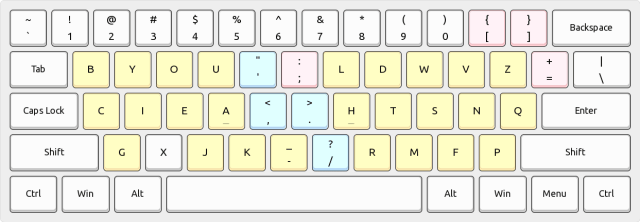
What did I choose?
As I was reading about alt layouts I saw an analysis of Pine v(4), which mentioned it as a variant of NRTS HAEI layouts with a little bit of a pinky issue due to having the Y on the upper row. But if you’re willing to live with that… it really caught my eye.

The THE and HE bigram looked very nice. The YOU vowel stack is nice. HE, SHE and SAID is easy to type. Even though I hammer active voice, there’s nothing wrong with WAS and it’s very nice to type in Pine. ING is a nice flow. ED is a nice pattern on a slab. I like the E on a stronger finger than ring.
But was I just going down a rabbit hole?
Well, I couldn’t find a design theory document on why the creator of Pine v(4) chose the layout. It was clearly in the popular NRTS HAEI family, but why this variation? Was it really better than Graphite?
I had settled on adopting what the AKL experts recommended. Go with Graphite as a modern, balanced layout to play with in my spare time. But… but… I joined the AKL discord and started reading. And someone posted a link to the AKL ‘keyboard battles’ web app. It’s an app that lets you input your own key layout, and then it ‘translates’ different words into random keyboard layouts and lets you type in it. So it would give you the word DARB to type, and then EAST. You type each one 3 times, 2-3 rounds, and then you rate what was more comfortable for you, and it also tracks how long each took to type between letters.
The data is early days, but there’s some data, and what struck me was that NRTS HAEI layouts dominate the top 10:

Pine, Maya, Nerps, Sertain, Seminak, and Graphite are all NRTS HAEI variants, IIRC. 6 of the top 10 are from that family. To me that was a good indication that I could safely try Pine v(4).
About two weeks ago, I made the decision to try to become bi-lingual. I lost QWERTY in 2018 for Colemak, but I’ve been spending 30 minutes a night typing in Pine 4 to learn it, and the rest of my day in Colemak.

I’ve learned 16 letters of 26, and bounce around 30-45 wpm (my accuracy dove with a new letter introduction recently, and by dove, dropped to 98.5%, which is wild because 98% is where I sit with Colemak after 8 years of use).
The bi-lingual bit is weird, I’ve been able to hold my fingers over the keyboard and just announce verbally to myself “I’m going to type in Pine!” or “I’m going to type in Colemak!” and… it works.
Until today. This morning I woke up and… couldn’t type in either. I would have panicked, but I know the feeling from 2018, and so I spent 15 minutes doing a typing tutor in Colemak and then I was back to normal, typing this essay.
My plan is to spend another two or so weeks typing in Pine in the evenings for half an hour a day, until I have all the letters and punctuation down, and 45-50wpm under my belt, and then switch over. I hadn’t planned on doing this over winter. In 2018 I spent hours a day practicing, and it was this herculean effort with a lot of pulling my hair out in frustration.
Eight years later, I know overtraining is a thing. I’m making the same progress in 30 minutes a day that I made in 8 hours a day back then and remaining productive in Colemak. In fact, doing 30 minutes a day, my typing tutor, KeyBr.com, suggests that I’ll learn Pine in 4 weeks total, instead of the two months it took in 2018.
I’ve learned how to learn a new layout, possibly.
So far the biggest challenge has been that the G and D keys are on V and N keys if you look at QWERTY. Lower case g and d are things I struggle with due to dyslexia, so having them on the opposing fingers has made them the hardest letters to learn. Words like digit, or giddy fall apart on me as I’m learning.
But it feels great, an upgrade from Colemak.
curious, do you rearrange the keys on your boards to match the layout you type in most? or just know what’s supposed to be there in that layout?
Good question. No, I do not move the keys around. I leave them as QWERTY as I learn how to touch type on them, I never look at the keys anyway.